Module 27: Training at scale 40 min12 min quick readDeep learning
Gradient clipping and mixed precision
Clip gradients by their global norm, train in bf16 or fp16 with loss scaling, and diagnose NaNs, skipped steps, and loss spikes.
Before this: Gradient descent, Backpropagation, Training and regularization
Quick read: the intuition, interactive visualization, summary, and interview questions. The math, implementation, engineering, and knowledge-check sections are hidden.
Mental model. Two safety belts for a training loop. Clipping is a speed limiter: however hard one bad batch pushes, the update can only be so big. Loss scaling is a zoom lens: tiny gradients are magnified so 16-bit numbers can hold them, then shrunk back before the optimizer uses them.
You will learn to
- Compute the global L2 norm of all gradients and clip it to a threshold without changing the update's direction.
- Explain what fp16 and bf16 can and cannot represent (overflow, underflow, precision), and why the optimizer keeps an fp32 master copy.
- Trace a dynamic loss scaler: scale, backward, unscale, check for inf/NaN, skip and halve, or step and eventually double.
- Write a PyTorch AMP step in the right order and diagnose the usual bugs: clipping scaled gradients, NaN losses, a scale that never moves.
Why it matters. Every large training run uses 16-bit arithmetic for speed and memory, and almost every LLM recipe clips gradients at a norm of 1.0. When a run diverges at step 8,000 or the loss turns into NaN, these two mechanisms are the first suspects. Interviewers ask about them because the bugs are silent: the loop keeps running while the model stops learning.
1. Intuition
Exploding updates. Gradient descent moves the weights by learning rate times gradient. Most batches give gradients of a sensible size. Once in a while a batch is strange (a corrupted document, a very long repeated sequence) and its gradient is hundreds of times larger than usual. One such step can throw the weights far from where they were, and the loss jumps up and may never come back.
Clipping. Measure the length of the whole gradient (all parameters together, as one long vector). If it is longer than a threshold, shrink the whole vector so its length equals the threshold. The direction is unchanged, only the step size is capped. Normal batches are untouched.
Why 16-bit at all. Matrix multiplies on modern GPUs run several times faster in 16-bit than in 32-bit, and 16-bit tensors take half the memory and half the bandwidth. So the forward and backward passes run in 16-bit while a few precision-sensitive things stay in 32-bit.
Two 16-bit formats.
- fp16 has 5 exponent bits: the largest value is 65,504 and normal numbers stop at about . Large values overflow to infinity; tiny gradients underflow to zero.
- bf16 has 8 exponent bits, the same range as fp32, but only 7 mantissa bits, so it is coarse (about 3 significant digits). It almost never overflows or underflows, which is why most LLM training now uses bf16.
Loss scaling (fp16 only). Many gradients in a deep network are around , below what fp16 can hold. Multiply the loss by a big number such as before backward. By the chain rule every gradient is multiplied by the same number, so they land in fp16's range. Divide them back before the optimizer step. If the scale is too big, some gradient overflows to infinity: skip that step and halve the scale. If many steps in a row are clean, try doubling it.
The master copy. Even with bf16 compute, the optimizer updates an fp32 copy of the weights. A tiny update like added to a weight of 1.0 is simply lost in 16-bit (the next representable fp16 number after 1.0 is 1.00098), so updates must accumulate in fp32. This is the 4-byte master copy in the fine-tuning lesson's 16 bytes per parameter.
2. Visualization
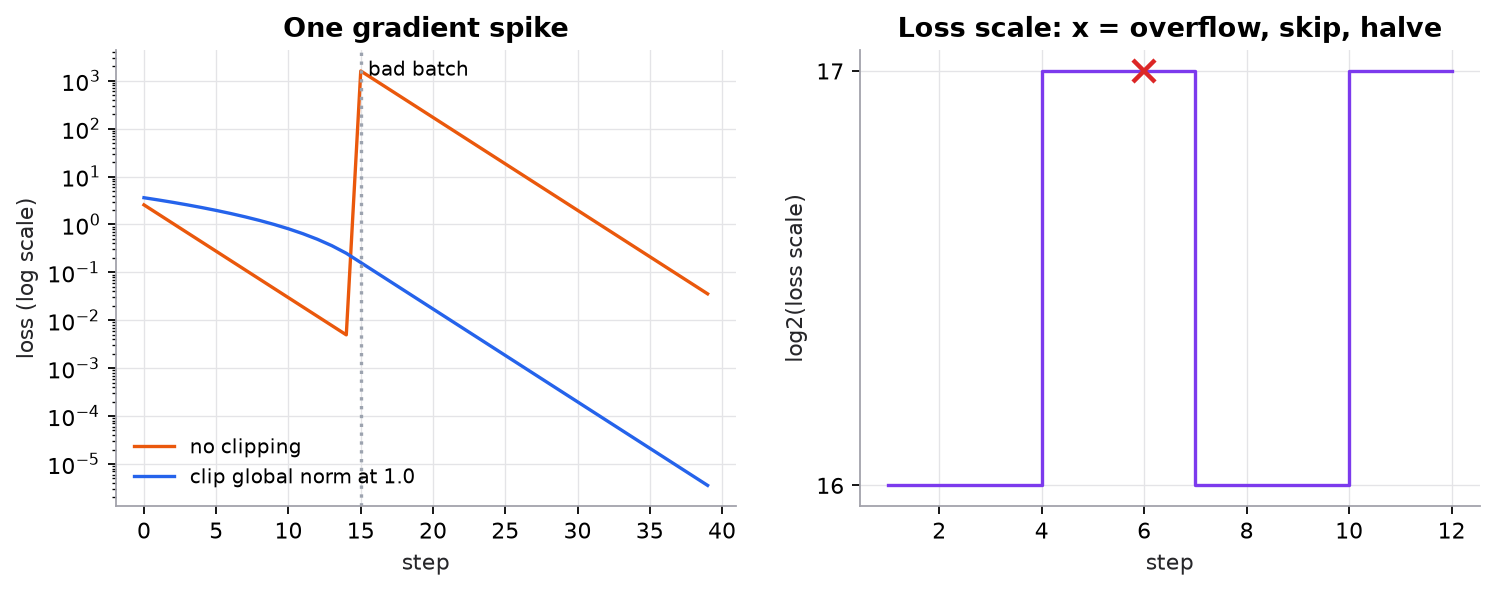
Synthetic data: a one-dimensional quadratic with one injected gradient spike (left) and random gradients around with one overflowing batch (right). The doubling interval is shortened to 3 steps so it shows up; PyTorch's default is 2,000.
Try it (predict first, then run code/27-training-at-scale/clipping_amp.py and edit it):
- Change the clip threshold in
run(1.0)torun(10.0). Predict whether the spike still breaks the run, then check the printed maximum loss after the spike. - Start the scaler at
2.0**24instead of2.0**16. Predict how many steps are skipped before it settles. - Remove the
* 2**16in the "without scaling" check and raise the gradient scale to1e-5. Predict what fraction now flushes to zero. - Notice the blue curve falls more slowly than orange before step 15. Predict why, then check which early gradients exceed 1.0.
3. The math
Symbols
| Symbol | Meaning | Shape |
|---|---|---|
| gradient of parameter tensor | same as tensor | |
| global L2 norm over all tensors | scalar | |
| clip threshold (max norm) | scalar | |
| loss | scalar | |
| loss scale | scalar, a power of 2 | |
| learning rate | scalar |
Global-norm clipping
Every tensor is multiplied by the same factor, so the direction of the full update is preserved. Clipping each tensor separately would change the direction.
Worked example. Two tensors, and , threshold .
- Sum of squares: .
- Norm: .
- Factor: .
- Clipped: , .
- Check: (rounding). The ratio before and after.
Loss scaling
Because the loss scale is a constant, the chain rule gives
Worked example. A gradient of in fp16: the smallest positive fp16 value (a subnormal) is , so rounds to 0. With : , comfortably representable. Unscale in fp32: , recovered.
The other side: a scaled gradient must stay under 65,504. With , any true gradient above overflows. That is what happened at step 6 in the figure: a bad batch with gradients near 1 overflowed, the step was skipped, and dropped to .
Scaler policy (the same as PyTorch's GradScaler): on overflow, skip the step and set ; after consecutive clean steps (default 2,000), set . The scale settles just below the largest value the gradients allow.
Precision in one table
| Format | Exponent bits | Mantissa bits | Max | Smallest normal | Spacing near 1 |
|---|---|---|---|---|---|
| fp32 | 8 | 23 | |||
| bf16 | 8 | 7 | |||
| fp16 | 5 | 10 | 65,504 |
Spacing near 1 is : for bf16, for fp16. An update smaller than half the spacing vanishes, which is why weights accumulate in fp32.
4. Implementation
Build it from scratch
The script is NumPy only, so the mechanism is visible. First, clipping. All tensors share one norm and one factor; the 1e-6 avoids dividing by zero when every gradient is zero.
def clip_global_norm(grads, max_norm):
    """Scale every gradient by the same factor so the norm of all of them together is <= max_norm."""
    total = np.sqrt(sum(float(np.sum(g.astype(np.float64) ** 2)) for g in grads))
    scale = min(1.0, max_norm / (total + 1e-6))
    return [g * scale for g in grads], total
Predict: the function returns the norm before clipping. Why is that the number you want to log, not the norm after?
Next, the scaler. It holds one number and one counter. unscale divides in fp32 and reports whether anything is inf or NaN; update applies the halve-or-double policy.
class LossScaler:
    def __init__(self, scale=2.0**16, interval=2000):
        self.scale, self.interval, self.clean = scale, interval, 0

    def unscale(self, grads16):
        grads = [g.astype(np.float32) / self.scale for g in grads16]
        finite = all(np.all(np.isfinite(g)) for g in grads)
        return grads, finite

    def update(self, finite):
        if not finite:
            self.scale /= 2
            self.clean = 0
        else:
            self.clean += 1
            if self.clean == self.interval:
                self.scale *= 2
                self.clean = 0
Predict: if update were only called on clean steps, what would the scale do after the first overflow?
Finally, one step. We simulate the backward pass by scaling true gradients and casting to fp16. The order matters: unscale, then check, then clip (on true-size gradients), then update the scaler whether or not the step was skipped.
def amp_step(true_grads, scaler, max_norm=1.0):
    with np.errstate(over="ignore"):
        grads16 = [(g * scaler.scale).astype(np.float16) for g in true_grads]  # scaled fp16 grads
    grads, finite = scaler.unscale(grads16)
    norm = clipped = None
    if finite:
        clipped, norm = clip_global_norm(grads, max_norm)
    scaler.update(finite)                       # runs on every step, skipped or not
    return finite, norm, clipped
Predict: if you clipped grads16 (still multiplied by ) at max_norm = 1.0, what would every update look like?
Use the library
PyTorch's automatic mixed precision does the same thing on real tensors:
scaler = torch.amp.GradScaler("cuda")           # not needed for bf16
for x, y in loader:
    optimizer.zero_grad(set_to_none=True)
    with torch.autocast("cuda", dtype=torch.float16):   # or torch.bfloat16
        loss = loss_fn(model(x), y)
    scaler.scale(loss).backward()               # backward on S * loss
    scaler.unscale_(optimizer)                  # grads /= S, records inf/NaN
    norm = torch.nn.utils.clip_grad_norm_(model.parameters(), max_norm=1.0)  # returns pre-clip norm
    scaler.step(optimizer)                      # skips the step if inf/NaN was found
    scaler.update()                             # halve or (eventually) double S
autocast picks the precision per operation: matrix multiplies and convolutions run in 16-bit, while reductions such as softmax and losses run in fp32. The model's parameters, and so the optimizer's update, stay in fp32: that is the master copy. With dtype=torch.bfloat16 drop the scaler entirely; bf16 has fp32's range. Hugging Face Trainer exposes the same switches as bf16=True, fp16=True, and max_grad_norm=1.0.
Run it
uv run code/27-training-at-scale/clipping_amp.pyKey lines of the output:
  grads [[3.0, 4.0], [12.0]], global norm = 13.0
  clipped [[0.2308, 0.3077], [0.9231]], new norm = 1.0000
  70000 in fp16       -> inf
  1e-8 in fp16        -> 0.0
  1e-8 * 65536 in fp16 -> 6.552e-04  (scaled, survives)
  1 + 1e-4 in fp16    -> 1.0  (lost: spacing near 1 is 9.77e-04)
  step  4  scale=2^17  STEP  norm=3.19e-06
  step  6  scale=2^17  SKIP  overflow, scale halved
  fraction flushed to zero in fp16 = 0.217; with scale 2^16 = 0.000
4) Loss spike: max loss after the spike without clipping = 1595.5, with clip 1.0 = 0.160
Without scaling, 21.7% of these synthetic gradients (standard deviation ) become exactly zero in fp16; with , none do.
5. Engineering
Defaults. LLM pre-training and fine-tuning recipes almost always clip at a global norm of 1.0, and bf16 autocast is the default on GPUs that support it (NVIDIA Ampere and newer, TPUs). Use fp16 plus a GradScaler only on older hardware.
Log the pre-clip norm every step. It is the best single health signal of a run. A slowly rising norm warns of instability before the loss moves. If the norm is above the threshold on most steps, the threshold is effectively a smaller learning rate; raise it or lower the LR.
Count skips. With fp16, a few skipped steps early in a run are normal while the scaler finds its level. A steady stream of skips means the model is producing infinities for a real reason (a bad batch, a too-high learning rate, an overflowing activation). Alert on a rolling skip rate, not on single skips.
Check the loss before backward. torch.isfinite(loss) is one reduction. A NaN loss usually comes from data (an empty sequence giving 0/0, a label out of range) or from an overflowing activation in the forward pass. Log the batch ID and skip it.
Where NaNs come from in bf16. No loss scaling is needed, but bf16 can still produce inf in attention logits or in a softmax computed in low precision, and its coarse mantissa can make loss curves noisier. Keep softmax, layer norm, and the loss in fp32 (autocast does this) and watch for attention logit growth in long runs.
FP8. Newer GPUs (Hopper and later) can run matrix multiplies in 8-bit floating point with per-tensor scale factors, using libraries such as NVIDIA Transformer Engine. The ideas are the same: a scale per tensor, kept in range from a history of maximum values, with fp32 master weights.
Common mistakes
- Clipping before
scaler.unscale_: the norm is measured on gradients multiplied by , so every step is clipped to almost nothing. - Calling
scaler.update()only on successful steps: the scale never drops after an overflow, and every following step is skipped. - Clipping each tensor separately (
clip_grad_value_or a per-layer loop) and assuming it equals global-norm clipping: it changes the update's direction. - Using fp16 without a scaler: small gradients silently become zero and the model learns slowly or not at all.
- Storing the weights themselves in 16-bit and updating them there: small updates round away (the 1 + 0.0001 = 1 problem).
- Treating clipping as a cure: if most steps clip, the real problem is the learning rate, the data, or initialization.
6. Knowledge check
Quiz: Gradient clipping and mixed precision
What problem does clipping gradients by their global L2 norm solve?
Practice exercise. Gradients are and , threshold . Compute the global norm, the clip factor, and the clipped gradients. Then do the same with .
Solution
Norm: . With : factor , so , , new norm 5. With : factor , nothing changes. Clipping only touches gradients that are too long.
Implementation challenge. Add a bf16 path to the script: emulate bf16 by keeping the top 16 bits of each float32 (view as uint32, add 0x8000 for rounding, mask with 0xFFFF0000). Run the same tiny gradients through it with no loss scaling and report the fraction that become zero.
Solution
def to_bf16(x):
    u = np.asarray(x, np.float32).view(np.uint32)
    return ((u + 0x8000) & 0xFFFF0000).view(np.float32)

print(np.mean(to_bf16(tiny) == 0))   # 0.0
bf16 has fp32's 8 exponent bits, so values near are far from its smallest normal number (). Nothing flushes to zero, which is why bf16 needs no loss scaler. What it loses is precision: each value keeps only about 3 significant digits.
Summary
- Global-norm clipping scales all gradients by : it caps the step size and keeps the direction. A norm of 1.0 is the common LLM default.
- fp16 has a narrow range (max 65,504, normals down to about ); bf16 has fp32's range but only about 3 significant digits.
- Loss scaling multiplies the loss by so small fp16 gradients survive, then divides it out. A dynamic scaler halves and skips on overflow, and doubles it after a run of clean steps.
- The correct AMP order is scale, backward, unscale, clip, step, update. bf16 needs no scaler.
- Weights update in an fp32 master copy because small updates vanish in 16-bit.
Next: Gradient checkpointing
Related: Training and regularization · Fine-tuning in practice · ZeRO and FSDP
Go deeper, code-first: AI Engineering from Scratch, gradient clipping and AMP.
Parts of this lesson are adapted from AI Engineering from Scratch by Rohit Ghumare (MIT license, notice): Gradient Clipping and Mixed Precision.
Interview angle
Why do we clip by the global norm rather than clipping each value?
Global-norm clipping treats all gradients as one long vector and rescales the whole vector if its length exceeds a threshold, so every parameter is multiplied by the same factor. The update keeps its direction and only its size is capped. Clipping each value at a threshold, or each tensor separately, shrinks some components more than others, which changes the direction the optimizer moves in, and can turn a sensible step into a biased one. Example: gradients [3, 4] and [12] have global norm 13; clipping to 1 multiplies all three by 1/13, keeping the 3:4:12 ratio. Value clipping at 1 would give [1, 1, 1], a completely different direction. In practice I clip at norm 1.0, log the pre-clip norm, and treat a run that clips almost every step as having a learning rate or data problem.
bf16 or fp16 for training? What changes in the loop?
I default to bf16 on any hardware that supports it. bf16 keeps fp32's 8 exponent bits, so it has the same range: gradients around 1e-7 don't underflow and large activations rarely overflow. That removes the need for a loss scaler, which removes a whole class of bugs. The cost is precision: 7 mantissa bits, about 3 significant digits, so the optimizer must keep fp32 master weights and precision-sensitive operations (softmax, norms, the loss) run in fp32, which autocast handles. fp16 has 10 mantissa bits, so it is more precise, but its range stops at 65,504 and its normals at about 6e-5. Many gradients sit below that, so fp16 needs a dynamic loss scaler: scale the loss, unscale before clipping, skip and halve on overflow. I use fp16 only on older GPUs without bf16 tensor cores.
Your fp16 run skips every step after step 300 and the loss is flat. What happened?
Every step being skipped means the unscaled gradients contain inf or NaN every time. First I check the scale: if it is stuck at the same value, scaler.update() is probably only called on successful steps, so it never halves after the first overflow. If the scale is falling toward tiny values and still overflowing, the infinities are real, not a scaling artifact: something in the forward pass overflows fp16, such as attention logits, an exploding activation, or a learning rate that has pushed weights too large. I log the loss with torch.isfinite, find the first non-finite layer with forward hooks, and check the batch. Fixes, in order: correct the update call, lower the learning rate, keep that operation in fp32, or switch to bf16, which has fp32's range. I would also alert on a rolling skip rate so this is caught within minutes.
Quick calculation: with a loss scale of 2 to the 17, which true gradients overflow fp16?
fp16's largest finite value is 65,504. A scaled gradient is the true gradient times the scale S = 2^17 = 131,072. It overflows when its magnitude exceeds 65,504, so any true gradient above 65,504 / 131,072, about 0.5, becomes infinity. That is why a single unusual batch with gradients near 1 triggers a skip at that scale. On the other end, the smallest positive fp16 value is about 6e-8, so with this scale true gradients down to about 6e-8 / 131,072, roughly 4.6e-13, still register. The dynamic scaler keeps S as large as possible, giving the most headroom at the small end, and halves it on overflow, so it settles at the largest power of two the current gradients allow. With the default interval it tries doubling every 2,000 clean steps.