Module 0: Mathematical and programming foundations 30 min6 min quick readMathematics
Vectors and matrices
Represent data and models as vectors, matrices, and tensors; compute dot products and matrix products by hand; and never lose track of a shape.
Quick read: the intuition, interactive visualization, summary, and interview questions. The math, implementation, engineering, and knowledge-check sections are hidden.
Mental model. A vector is a list of numbers describing one thing (a house, a word, a user). A matrix is a stack of such lists, or a machine that turns one vector into another. Almost every model computation is "multiply a matrix by a vector and add something."
You will learn to
- Distinguish scalars, vectors, matrices, and tensors, and state their shapes.
- Compute a dot product and interpret it as a weighted sum and as a projection.
- Multiply matrices by hand and predict the result's shape before computing.
- Use the shape habit to catch bugs before they happen.
Why it matters. A linear model is a dot product. A neural-network layer is a matrix-vector product. Attention is two matrix products and a softmax. If you can multiply matrices and track shapes, you can read any model's code.
1. Intuition
- A scalar is a single number: a learning rate, a loss value.
- A vector is an ordered list: a house described as
[bedrooms, thousand sq ft] = [2, 1.5]. Its length is its dimension. - A matrix is a grid of numbers, rows by columns. A dataset of 1,000 houses with 2 features is a matrix: one row per house.
- A tensor is the same idea with more axes. A batch of 32 color images of 64×64 pixels is a tensor of shape .
The dot product of two equal-length vectors multiplies matching entries and adds them up. If is a house and holds a price per unit of each feature, then is a predicted price. Geometrically, the dot product measures how much two vectors point the same way: large and positive if aligned, zero if perpendicular, negative if opposed.
Matrix multiplication is many dot products at once: each entry of is a row of dotted with a column of .
2. Visualization
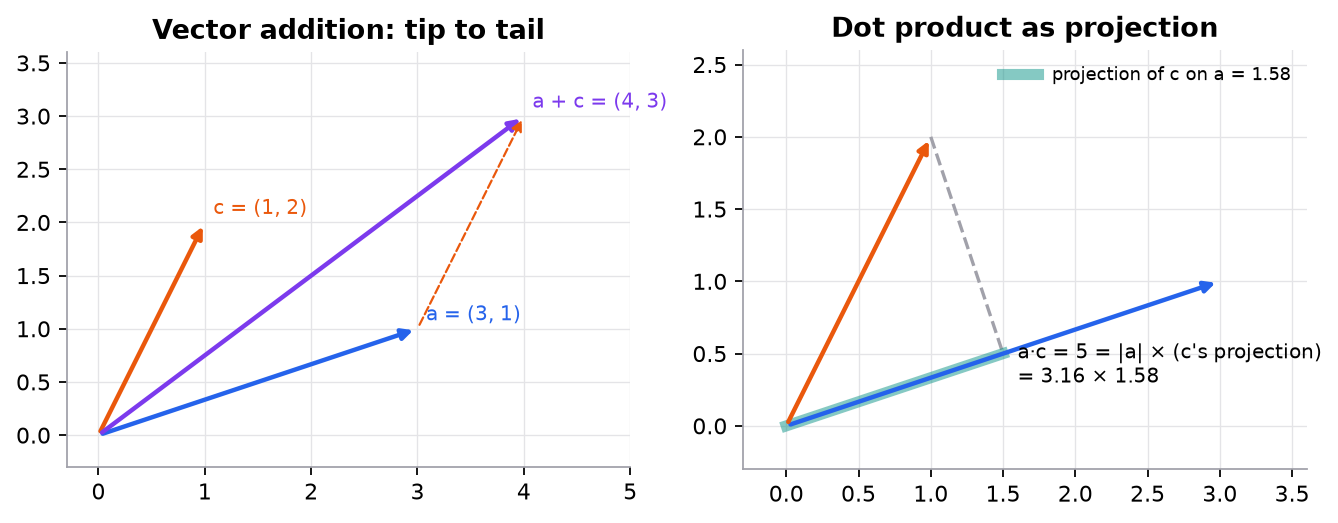
What to notice:
- Adding vectors places them tip to tail.
- The dot product equals (3.16) times the length of 's shadow on (1.58). If were perpendicular to , the shadow and the dot product would be 0.
3. The math
Symbols
| Symbol | Meaning | Shape |
|---|---|---|
| the -th entry of vector | scalar | |
| dot product | scalar | |
| length (Euclidean norm), | scalar | |
| entry in row , column of matrix | scalar | |
| transpose: rows become columns | if is |
Dot product
is the angle between the vectors. Dividing by both lengths gives cosine similarity, , used everywhere in NLP and retrieval.
Matrix product
If is and is , then is and
The inner dimensions () must match and disappear; the outer dimensions (, ) remain. Matrix multiplication is not commutative: in general, and often isn't even defined.
Worked example 1: a prediction as a dot product
Features (bedrooms, thousand sq ft), weights (thousand dollars per unit), bias .
Predicted price: 290 thousand dollars. If the true price is 310, the residual is and the squared error is (in thousand-dollars squared).
Worked example 2: matrix product with shapes
Shape check first: . Then, for example, = row 1 of dotted with column 3 of , and .
Worked example 3: cosine similarity
, : , , . , so the angle is 45°.
4. Implementation
You will build dot products, matrix products, and a rotation from plain Python lists, then check every answer against NumPy. Writing the loops once makes the shape rules stick.
Build it from scratch
A dot product multiplies matching entries and adds them up. The assert is the shape check that NumPy does for you; failing loudly here beats silently dropping entries, which is what zip would do on its own.
def dot(a, b):
    assert len(a) == len(b), f"shape mismatch: {len(a)} vs {len(b)}"
    return sum(ai * bi for ai, bi in zip(a, b))

def norm(a):
    return math.sqrt(dot(a, a))

def cosine(a, b):
    return dot(a, b) / (norm(a) * norm(b))
Predict: cosine([3, 1], [6, 2]) versus cosine([3, 1], [1, 2]). Which is 1.0, and why does scaling a vector not change the result?
Projection splits a vector into "the part along a" and "the rest". It is the geometric meaning of the dot product from the figure: scale a by how much of c points its way.
def project(c, a):
    """The part of c that points along a: (c·a / a·a) a."""
    s = dot(c, a) / dot(a, a)
    return [s * ai for ai in a]
Predict: what is project([1, 2], [3, 1])? Work it out by hand: c·a = 5 and a·a = 10.
A matrix product is a grid of dot products: entry (i, j) is row i of A dotted with column j of B. Transposing B turns its columns into rows so dot can reuse them. The assert is the inner-dimension rule from section 3.
def shape(M):
    return (len(M), len(M[0]))

def transpose(M):
    return [list(col) for col in zip(*M)]

def matmul(A, B):
    (n, k), (k2, m) = shape(A), shape(B)
    assert k == k2, f"inner dims differ: {shape(A)} @ {shape(B)}"
    Bt = transpose(B)                                   # columns of B as rows
    return [[dot(row, col) for col in Bt] for row in A]  # entry (i, j) = row i · column j
Predict: matmul(A, A) for the [3, 2] matrix A from worked example 2. Does it run? What about matmul(transpose(A), A), and what shape comes out?
A matrix is also a function that moves points. A rotation matrix turns every vector by the same angle, and multiplying two transformation matrices composes them.
def rotation(theta):
    c, s = math.cos(theta), math.sin(theta)
    return [[c, -s], [s, c]]

def apply(M, v):
    return [dot(row, v) for row in M]
Predict: where does apply(matmul(R, R), [1, 0]) land when R = rotation(math.pi / 2)?
Answers
Both cosines: [6, 2] is 2 × [3, 1], so the angle is 0 and the cosine is exactly 1.0; scaling cancels because it multiplies the numerator and the norm by the same factor. [1, 2] gives 0.7071 (45°). Projection: s = 5/10 = 0.5, so the result is [1.5, 0.5]. A @ A fails: inner dims 2 and 3 differ. Aᵀ @ A is [2, 3] @ [3, 2] = [2, 2]. Two 90° rotations make a 180° rotation, so (1, 0) lands on (−1, 0).
Use the library
NumPy runs the same operations in compiled code, and @ is the matrix product. Everything above becomes one line each.
import numpy as np

x = np.array([2, 1.5])
w = np.array([30, 120])
print(x @ w + 50)                  # 290.0  (@ is the matrix/dot product)

X = np.array([[2, 1.5], [3, 2.0], [1, 0.8]])   # [3 houses, 2 features]
print(X @ w + 50)                  # [290. 380. 176.]  one prediction per row: [3,2] @ [2] -> [3]

A = np.array([[1, 2], [3, 4], [5, 6]])
B = np.array([[1, 0, 2], [0, 1, 1]])
print((A @ B).shape)               # (3, 3)
print(A * A)                       # element-wise, NOT a matrix product
What NumPy adds over the scratch version: speed (BLAS kernels, see Python toolkit), broadcasting so X @ w + 50 adds 50 to every row, and batched products over leading dimensions ([batch, n, k] @ [batch, k, m]). What it hides: A * A is legal and silently does the wrong thing if you meant A @ A.
Run it
From guide/:
uv run code/00-foundations/vectors_scratch.pya·c = 5, |a| = 3.1623, cos θ = 0.7071
projection of c on a = [1.5, 0.5]
house price x·w + b = 290.0
A (3, 2) @ B (2, 3) = (3, 3): [[1, 2, 4], [3, 4, 10], [5, 6, 16]]
A @ A -> inner dims differ: (3, 2) @ (3, 2)
rotate (1, 0) by 90°: [0.0, 1.0]
two 90° rotations = one 180°: [-1.0, 0.0]
all checks match NumPyFull script: code/00-foundations/vectors_scratch.py. The module's figures come from code/00-foundations/foundations.py.
5. Engineering
The shape habit. Write shapes next to every line: X @ W # [B, d_in] @ [d_in, d_out] -> [B, d_out]. Most deep-learning bugs are shape bugs, and the worst ones don't crash: broadcasting silently turns a [B] minus [B, 1] into a [B, B] matrix.
Vectorize. One matrix product over a batch is thousands of times faster than a Python loop of dot products, because it runs in optimized BLAS or GPU kernels. Batching is also why GPUs make deep learning practical.
Cost. A product of and takes multiply-adds. Counting these tells you where a model spends its compute.
Watch outFailure modes. Confusing
*(element-wise) with@(matrix product); transposing to silence a shape error instead of understanding it; broadcasting a[n]vector against[n, 1]and getting[n, n]; integer arrays truncating results.
Common mistakes
- Assuming .
- Forgetting that a dot product needs equal lengths.
- Reading a matrix as columns-per-example when the code uses rows-per-example (frameworks use rows).
6. Knowledge check
Quiz: Vectors and matrices
Compute .
Practice exercise. Compute , then the shape of where is and is .
Solution
. .
Implementation challenge. Write matmul(A, B) with three nested Python loops, check it against A @ B on random matrices, then time both for inputs.
Summary
- Vectors describe one example; matrices stack examples or transform vectors; tensors add more axes.
- The dot product is a weighted sum and a measure of alignment; cosine similarity normalizes it.
- : inner dimensions must match and disappear.
- Write shapes next to every operation and vectorize instead of looping.
Next: Calculus for ML
Related: Forward pass · Self-attention
Parts of this lesson are adapted from AI Engineering from Scratch by Rohit Ghumare (MIT license, notice): Linear Algebra Intuition, Vectors, Matrices & Operations, Matrix Transformations.
Interview angle
What does a dot product measure geometrically, and why do embedding systems usually rank by cosine similarity instead of the raw dot product?
The dot product mixes two things: how aligned the vectors are and how long they are. Cosine similarity divides out both lengths, leaving only direction, in . In embeddings, direction usually encodes meaning while length often tracks nuisance factors such as word frequency or document length, so a raw dot-product search can favor a vector just for being long. Example: and have dot product 5 but cosine 0.707, a 45° angle. Practical point: if you L2-normalize every vector once at indexing time, the dot product equals the cosine, so a vector database can use fast inner-product search. If a retriever was trained with unnormalized dot-product scoring, use what it was trained with; switching between the two silently changes rankings.
What does multiplying an [m, n] matrix by an [n, p] matrix cost? Estimate the FLOPs for a batch of 64 inputs through a 4096 → 4096 linear layer.
It takes multiply-adds, because each of the output entries is a length- dot product; that is usually quoted as FLOPs. Here is and is , giving a output. Multiply-adds: , so about 2.1 GFLOPs. The weights alone are 16.8M parameters, 67 MB in float32. The follow-up insight: that is only about 32 FLOPs per byte of weights loaded, below what a modern GPU needs to stay compute-bound, so at small batch sizes this layer is limited by memory bandwidth rather than arithmetic. Larger batches reuse the same weights for more rows and raise utilization, which is why inference servers batch requests together.
Your regression loss is `((y - y_hat) ** 2).mean()`. Training doesn't crash, but the loss plateaus high and every prediction converges to the same value. What's the likely bug?
Broadcasting. If y has shape [B] and y_hat has shape [B, 1] (a linear layer with one output), then y - y_hat broadcasts to [B, B]: every prediction is compared with every target. Minimizing that pushes each prediction toward the mean of all targets, so predictions collapse to a constant and the loss stalls near the target variance. Nothing errors, which is why it survives code review. Fix: squeeze the output (y_hat.squeeze(-1)) or reshape y to [B, 1], and assert shapes before computing the loss: assert y_hat.shape == y.shape. PyTorch's MSELoss even warns about this exact mismatch, and people ignore the warning. The general habit from this lesson: write the shape next to every line, and treat any [B, B] tensor you did not intend as a bug.
A vectorized matrix product does the same arithmetic as a Python loop of dot products. Why is it often 100× or more faster?
Same number of multiply-adds, very different execution. A Python loop pays interpreter overhead on every element (type checks, boxed objects, function calls), often hundreds of nanoseconds for work the CPU does in under one. A single X @ W call hands the whole problem to an optimized BLAS or GPU kernel that uses SIMD instructions, all cores, and cache blocking: it loads a tile of into fast cache and reuses it for many rows of before evicting it. That reuse is the key, because memory traffic, not arithmetic, usually limits speed. Typical speedups are 100× to 1000× on CPU and more on GPU. The trade-off is memory: a batched computation holds the whole batch at once, so batch size is chosen to fit memory. This is also why deep learning is written as matrix products in the first place.